Sample Collection
Learn how your Air Lab collects samples, and how to calculate the maximum recording length possible based on its settings.
Buffers
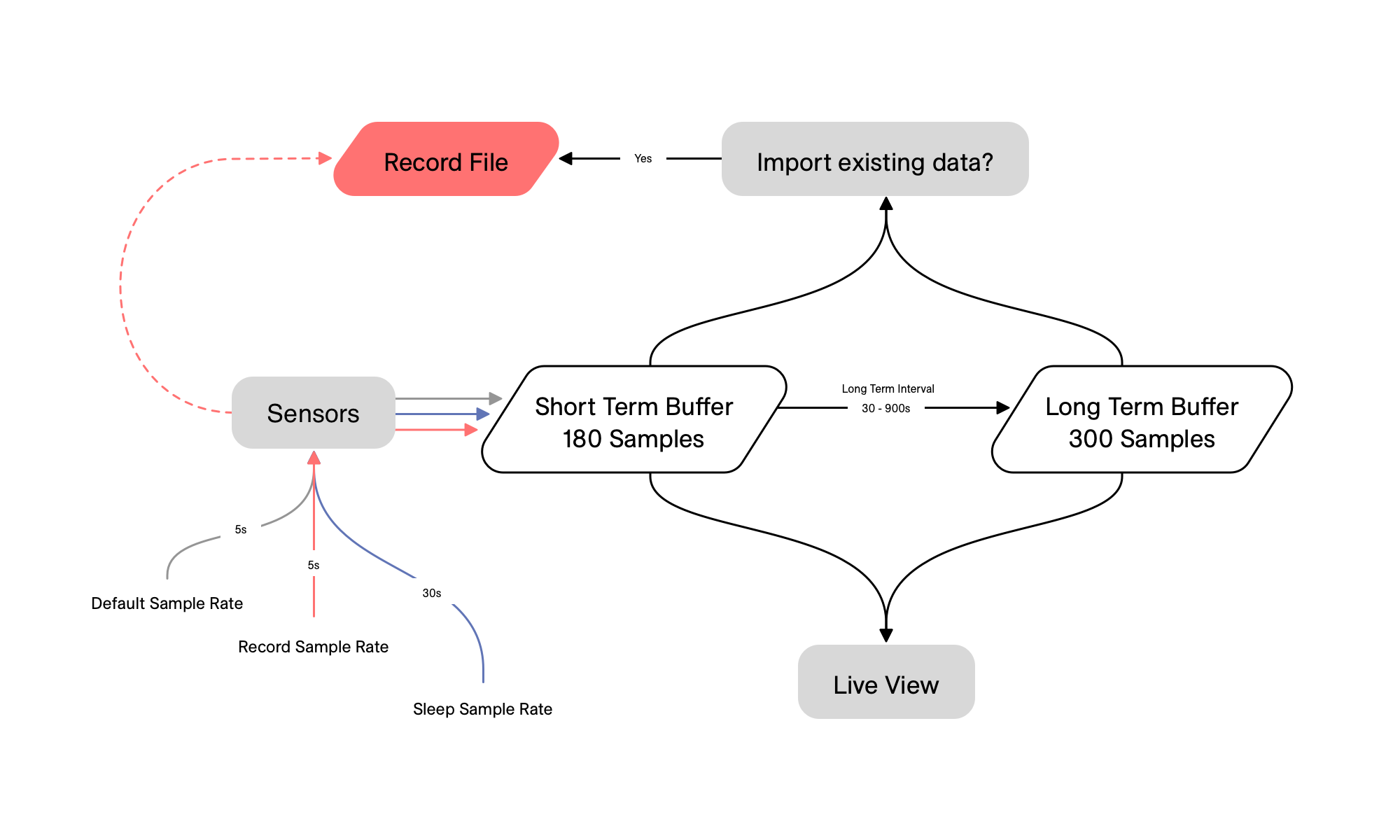
Your Air Lab continuously captures air quality data in the background, even when you're not actively using it. This means you can check the Live View or start a new measurement and immediately see recent history—no waiting required.
This background data is stored in buffers, temporary storage areas that hold samples. Your Air Lab uses two buffers: a short-term buffer for recent, high-resolution data, and a long-term buffer for extended history. Once the short-term buffer fills up (after 15 minutes to 30 hours depending on settings), it begins moving samples into the long-term buffer at a rate set by the Long-term Interval.
At an interval of 600 seconds (10 minutes), the long-term buffer takes about 50 hours to fill before it starts overwriting the oldest samples. You can calculate the length using this formula:
Length in Hours = (Long-term Interval * 300) / 3600Recording
When you start a measurement, your Air Lab saves all samples to a dedicated file. Unlike buffers, recordings never overwrite old data—they keep everything until you stop.
Each sample is appended to the file sequentially. Because there's no overwriting, the maximum recording length depends only on available storage space.
Sample Rate
The Sample Rate controls how often your Air Lab takes a snapshot of your environment. A higher rate captures more detail but uses more battery and storage; a lower rate conserves both but may miss rapid changes.
Use a high sample rate for dynamic environments—a crowded train, a craft workshop with fluctuating VOC levels. Use a lower rate for stable environments, like a bedroom overnight.
Rates and Intervals
Your Air Lab uses different sample rates depending on what it's doing. This lets you balance detail against battery life for each situation.
- Awake Sample Rate: How often samples are taken while the device is awake or connected. Options range from 5 seconds to 5 minutes (default: 5 seconds).
- Sleep Sample Rate: When in sleep state, sampling continues at a reduced rate to save battery. Options range from 5 seconds to 10 minutes (default: 60 seconds).
- Record Sample Rate: During a recording, this rate overrides both awake and sleep rates. Options range from 5 seconds to 5 minutes (default: 5 seconds).
- Long-term Interval: Controls how often samples are moved to the long-term buffer. Set between 30 and 900 seconds in increments of 10. Only samples that are at least this far apart are kept; others are discarded.
The sleep and record rates are part of the power settings, since they directly shape battery life—see Power & Battery for the trade-offs and the battery life profiles that adjust them together.
Interpolation
When you scroll through data in Precision Mode, every sample appears evenly spaced—even though your Air Lab may have recorded at different rates. This consistency is achieved through interpolation.
As the device moves between sleep state and active use, the sample rate changes. For example, sleep state might sample every 60 seconds, while active use samples every 5 seconds. The short-term buffer ends up with mixed-rate data. Interpolation fills in the gaps by calculating and inserting new samples between existing ones, making the data appear uniform.
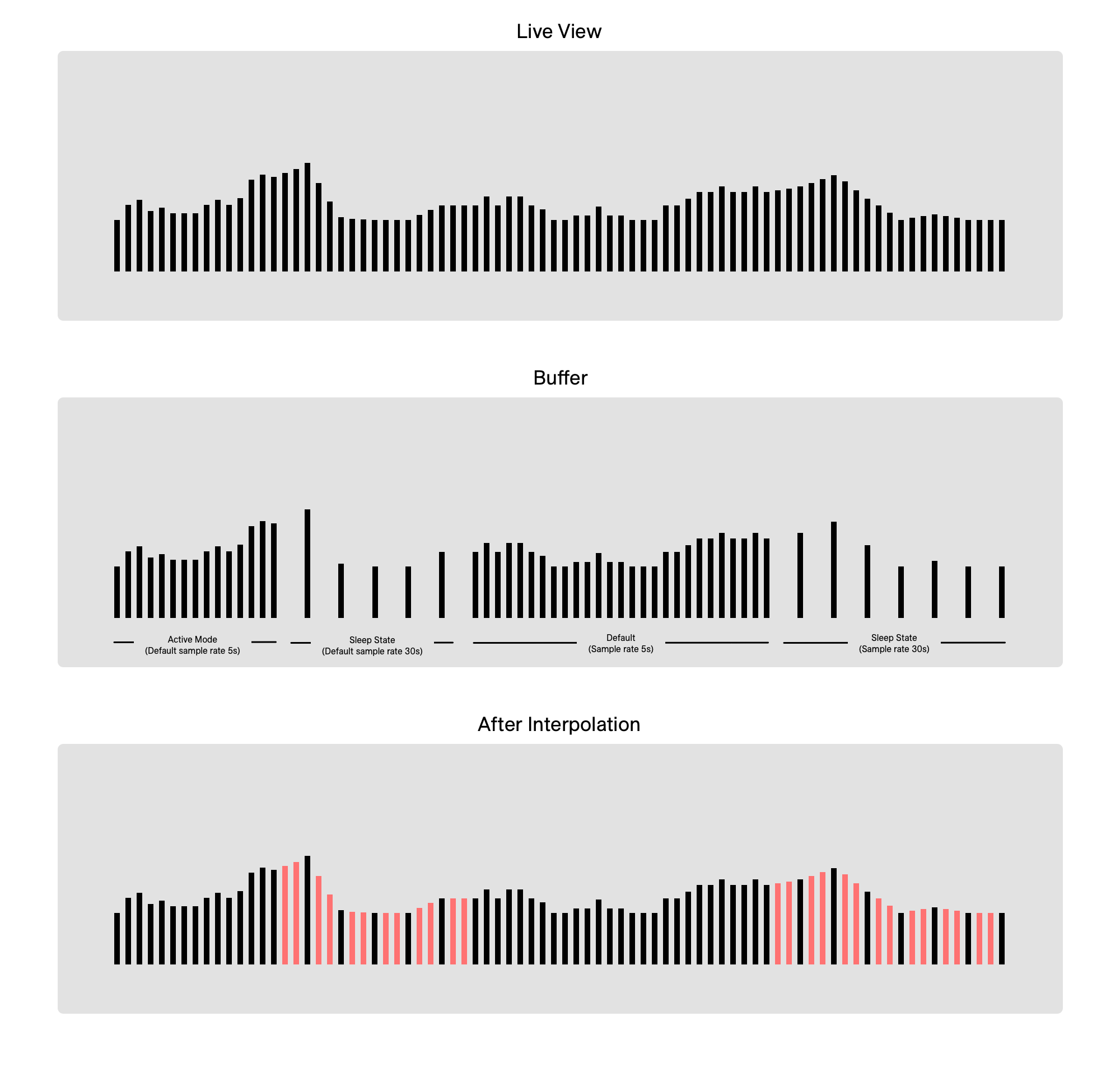
In both Air Lab and the diagrams above, each line represents one sample. The red lines in the lower diagram show the interpolated samples.
Back to Top